Club Benefits





The Apple Watch 10 and Whoop 5.0/MG both appear in our guide to the best sleep trackers of 2026 and you're probably wondering which is right for you. Apple's flagship watch, first released in 2015, is now in its 11th generation and is arguably the most popular smartwatch of all time.
By comparison, the Whoop fitness and recovery tracker, also launched in 2015, was initially marketed as a recovery tool for elite athletes. The brand has since moved to a subscription model and the device gained more mainstream popularity, particularly with those looking to get more in-depth insights into their sleep.
So, how do they compare? As a sleep tech reviewer (and amateur triathlete), I've put both the Apple Watch 10 and the Whoop MG through their paces under our thorough sleep tracker testing methodology. Here I'll unpick how they compare in terms of cost, design and sleep tracking functionality to help you decide which one to snap up in this month's Memorial Day sleep tracker sales.
- Sleep better for less: We're live tracking this year's best value Memorial Day mattress sales
Apple vs Whoop: Price & value for money

Whoop runs a unique pricing system. While you don't actually pay an upfront cost for the hardware, you pay an annual membership fee (essentially a subscription) that grants access to health and sleep tracking software.
There are three price tiers. The more you pay, the more luxurious your band and the more features you can access. The most affordable option, 'Whoop One' starts at $199/£169 per year.
The mid-level 'Whoop Peak' costs $239/£229 per year and the top-tier plan, 'Whoop Life', sets you back $359/£349 annually. The first two tiers come with a Whoop 5.0 and the most expensive tier gets you the Whoop MG.
In terms of sleep tracking functionality, there isn't too much difference between the different price tiers, though you do get Whoop's Healthspan, Health Monitor and Stress Monitor features with the Peak plan and up. The Life plan also grants blood pressure insights and on-demand medical-grade ECG sensing.

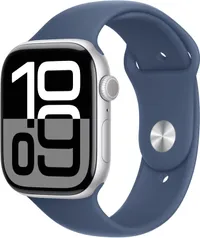
On the other hand, the Apple Watch comes with a one-off payment rather than a rolling annual fee. Brand new, the 46mm Apple Watch Series 10 is available at $365.68, down from $429, at Amazon US at the time of writing. Or the smaller, 42mm model is at an MSRP of $399.
At Amazon UK, however, there are only used models available, starting from around £230.
As the Series 10 has now been replaced by the Apple Watch Series 11, you can get refurbished and open box models at a cheaper cut from third-party retailers like Best Buy and Walmart, as well as Apple itself.
A open box Apple Watch Series 10 42mm in rose gold with plum sport loop for $194 (was $206) at Walmart is currently the best price we've seen — that includes free shipping and free 30-day returns.
WINNER: APPLE WATCH 10
With a one-off purchase fee and the most up-to-date iOS software, you get great value for money shopping the Apple Watch 10. Just two years Whoop subscription would be more expensive than the Apple Watch.
Apple vs Whoop: Design & Battery
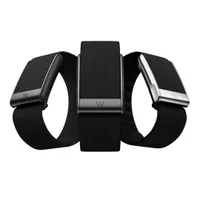
Both wrist-worn, the biggest difference between these two trackers is that the Apple Watch has a screen, the Whoop doesn't (which is a bonus as sleep experts typically warn against brightly lit screens in bed.)
At 7% smaller and thinner than its predecessor, Whoop 4.0, the Whoop 5.0/MG brings comfort improvements.

The pricing tier you pick at Whoop will determine what band and tracking device you get. Whoop One comes with the 5.0 monitor, basic wired charger and CoreKnit band.
Whoop Peak includes the 5.0, SuperKnit band, and a wireless charger. Whoop Life upgrades to the Whoop MG monitor and SuperKnit Luxe band.
I've been wearing the CoreKnit band with my Whoop MG. While soft, I find the thickness of it can feel quite agitating when worn overnight; though I am easily flustered by wearing any jewellery in bed.

The Apple Watch 10 is one of the lightest and slimmest Apple Watches you can buy, weighing around 1-1.5oz/30-42g depending on the version you choose. There are two case sizes (42mm and 46mm) it comes in aluminium or polished titanium cases (and various color and finish options for each).
As the best iOS smartwatch, wearing the Apple Watch is like having your iPhone's younger sibling attached to your wrist. Features include receiving notifications, transferring data from your phone, you can text and call from it, and pay for your groceries via Apple Pay.
Although you can turn on a Sleep Focus mode that dims the screen and silences notifications overnight so you can sleep distraction-free, having that touch screen device on in bed feels a little more obtrusive than the discreet Whoop band.
But if wearing a wristband that's been harbouring your sweat all day to bed irks you (and rightly so in my opinion), then the contactless Withings Sleep Analyzer, which you place under your mattress, could be a better tracker for you.

Battery life is also a key area we assess when reviewing sleep trackers. Since it works a nightshift as well as having daytime tracking responsibilities, it's important your wearable holds charge well and recharges quickly. Frankly, there's a clear winner here: Whoop.
Poor battery life is a commonly cited pitfall of the Apple Watch, especially when compared to other popular wearable brands like Garmin and, indeed, Whoop.
With an epic 14-day battery life on a single charge, the Whoop 5.0/MG simply can't be compared with the Apple Watch's comparably measly 18 hour battery life (though it can last up to 36 hours on low power mode). I've done the math and that means the Whoop outlives the Apple Watch (on full power) more than 18 times over.
Whoop really steps up with its wireless charger — you just slide it onto your Whoop wearable, meaning you can still charge up and track your sleep even if you spot the battery is low before hitting the hay (though, of course, it makes the band more bulky to sleep in with the charging power pack attached).
It is worth noting that the wireless charger only comes with the Peak and Life memberships, though that does mean you'll get it with the MG.
WINNER: WHOOP MG
Screenless and super powerful, the Whoop is better designed for sleep tracking.
Apple vs Whoop: Sleep tracking
Whoop's sleep tracking is more 'nerdy' than Apple's. Geared toward pro athletes, of course, it's going to delve deeper into health data. I tested the Whoop MG, but the sleep tracking features are available on all tiers.
You receive a Sleep Performance score for each night, which is comprised of various elements of sleep that the device tracks, including time spent in each sleep stage, disturbances during the night, sleep efficiency (the percentage of the time spent in bed that you're sleeping), sleep consistency and sleep stress.
Plus, your score factors in 'sleep sufficiency,' which they describe as how much sleep you managed vs the your recommended 'sleep need'. This is based on sleep debt, baseline sleep, naps and the 'strain' (cardiovascular and muscular exertion) your body has been under that day.

An AI sleep coach is also available to help you understand your score and provide sleep tips, and Whoop will also recommend a bedtime based on accumulated sleep debt and how much rest you need to catch up.
During marathon training blocks when I've really been locking in on my physical performance and recovery, I've found Whoop's advanced sleep tracking, and the more health-focused features, really helpful.
The unique 'strain' score and heart rate variability (HRV) readings help me understand when I need to take a little more rest (low HRV usually means your body is under a lot of stress), and I can see how well my body is responding to training via VO2 max figures (higher numbers typically indicate good fitness levels).
However, during down-time between endurance events, I find Whoop's level of health monitoring a little overwhelming. In my opinion, it's not necessary to go into that much depth on your health status for the average person looking to make healthier choices and sleep better.

In this case, Apple's sleep tracking functionality is just right.
The Apple Watch 10 tells you how long you've slept for, including how long you spent in each essential sleep stage, how well you're sticking to a consistent bedtime, how many times your sleep is interrupted through the night, and you're awarded an overall sleep score (though this score is a newer feature and requires you to have watchOS 26).
Are you missing anything by opting for the older model at Apple? Honestly, not really.
You may enjoy six more hours battery life with the Series 11, as well as 5G connectivity, and tougher screen protection. But in terms of sleep tracking, the updates we saw with the Series 11 were mostly software based.
That means, providing your series 10 Apple Watch runs on on watchOS 26, you'll be awarded a nightly sleep score and access all sleep metrics available at Apple.

Apple's sleep tracking functionality is still technical, especially considering the watch has an FDA-approved sleep apnea detection feature. This means Apple's sensors track your breathing and alert you (if you turn on sleep apnea notifications) if it suspects breathing patterns linked to the disorder .
While it's useful information, Apple point out that this feature is not intended to diagnose sleep apnea. Instead, it's data you can share with your doctor who can determine if you may be experiencing the sleep disorder.
You can, in theory, identify symptoms of sleep apnea with Whoop by paying careful attention to your respiratory rate, blood oxygen levels, and nighttime disturbances. But there's no specialised sleep apnea detection feature with FDA backing as there is with Apple.
WINNER: APPLE WATCH 10
Apple takes the edge for me, offering enough detailed insights for most sleepers without getting too complex.
Apple vs Whoop: The apps
Without an actual screen on the wristband, you operate the Whoop through its app. This has an upside and downside: while keeping screens out of bed is a positive, you may be more likely to reach for your phone first thing in the morning (not a great way to start the day, according to health experts) to view sleep metrics rather than glancing at them on a watch.
Loaded with percentages and graphs, the Whoop interface can be a little intense upon first look. But once you have a browse around and read up on what each sleep metric means and how the scores are calculated, it becomes more easy to navigate.
There are plenty of useful features in the app, too, including a sleep diary where you can log any lifestyle habits that may be disrupting your sleep, like caffeine and alcohol consumption, and the aforementioned AI-generated sleep coach.
By comparison, you can find brief sleep data on your actual Apple Watch, with more detailed metrics and charts living in the Apple Health app on your iPhone, including more information about any sleep apnea notifications you have received.
In the app's sleep tab, you'll find your sleep score and nightly sleep stage graph. You can also delve deeper into your overnight 'Vitals' section (like your sleep data, you can see the basic breakdown of 'Vitals' on your Apple Watch).
This tool tracks various metrics overnight, like heart rate, respiratory rate, and wrist temperature, explicitly highlighting whether each reading falls within your typical range. While this information isn't factored into your sleep score, it is useful to be aware of.
You can also set a sleep goal for the amount of sleep you want to aim for each night, and manually set up a sleep schedule (which can be adjusted for different days of the week — who doesn't enjoy a Sunday lie in when they can?!). When you're setting your bedtime and wake times, you'll be able to see if it meets your sleep goal and set wake up alarms. Plus, there's the sleep focus mode we mentioned above.
It's worth noting you can also set your sleep goal, schedule and sleep focus timings directly on your Apple Watch, but you may find it easier to do on a larger screen.

Overall, while Apple Health presents you with plenty of useful data teaching you about your sleep patterns and habits, Whoop helps you understand exactly what you must do to improve your sleep health — like hit a target bedtime to minimise sleep debt.
There is sleep advice in the Apple Health app, but it's not tailored to your individual sleep metrics.
Winner: IT'S A DRAW
Apple's app is easier to digest but Whoop provides more personal, useful sleep coaching.
Apple vs Whoop: Final verdict
It's hard to say which is the better sleep tracker overall. Ultimately, it depends what you want from your tracker and what your lifestyle looks like.
If you're an athlete or fitness fanatic on a strict program working towards a certain goal, there's a lot of value to the Whoop 5.0/MG as it gives you detailed breakdown of how your sleep and recovery is, or isn't, supporting your physical performance.
But, if you want a well-rounded fitness and sleep tracker, which can log your gym classes and give you data on your night's sleep, as well as functioning as a smartphone on your wrist, the Apple Watch is a great choice.
Unless you're an athlete of any kind, pick the Apple.
You'd be hard pressed to find a more functional, trendy smartwatch. And after the initial purchase fee, you won't have to worry about upkeeping a subscription.