Tom's Guide Verdict
The Surface Laptop Ultra isn’t trying to be a MacBook Pro killer — it is a completely different species of laptop. The RTX Spark inside trades peak efficiency for a massive memory pool, almost desktop-class RTX gaming, and superior local AI performance. All boxed in a gorgeous utilitarian design with a great screen and hardware features that redefine premium Windows devices — for a price.
Reasons to buy
- +
The utilitarian aesthetic is badass
- +
Magnetic USB-C port is durable and brilliant
- +
Stellar ergonomics
- +
RTX Spark shines in creator, gaming and local AI performance
Reasons to avoid
- -
Battery life and CPU performance trails Apple
- -
Mini LED not as vivid as OLED rivals
- -
Can get hot fast
Why you can trust Tom's Guide Our writers and editors spend hours analyzing and reviewing products, services, and apps to help find what's best for you. Find out more about how we test, analyze, and rate.
After telling you about my week living with Nvidia RTX Spark, now I can tell you about the laptop housing it. Microsoft’s Surface Laptop Ultra is easily the most powerful Surface to come out of Redmond, and this is a badass-looking utilitarian notebook to match that energy.
The aluminum shell housing all the internals feels satisfyingly ultra-premium, while opening it up reveals that sharp mini-LED display — not as vivid as OLED, but bright, buttery smooth and color accurate all the same. And those ergonomics are stellar with a great-feeling keyboard and a touchpad that can talk back to you with haptics when you do things around Windows 11.
Then there’s the tweaks to Windows 11 itself. Beyond what you see in version 26H2, setting up an agent is now simpler than ever as part of the startup process. And powering all of this is that RTX Spark — turboboosting a lot of those agentic workflows I created to free up my personal time, alongside the moments of creativity in ComfyUI.

On top of that, it eliminates the compromise between either being a good creator notebook or good at gaming, and just giving you the best of both worlds.
Don’t fall for the marketing hype, though. I know Microsoft is welcoming you to “break up with your MacBook Pro,” and inviting the comparison. And across a few stats, Apple does dominate — like battery life, surface temperatures and raw CPU performance. If you came in looking for this, that high price tag will feel like a sharp sting.
But if you understand what this is — a different species of laptop that focuses on beefing up the GPU grunt — then the story changes. This isn’t a MacBook Pro killer. It’s a creator laptop by day, gaming system by night, and a glimpse at the local future of AI.
Microsoft Surface Laptop Ultra: Cheat sheet
- What is it? Microsoft’s new flagship 15-inch workstation laptop, powered by Nvidia’s RTX Spark chipset.
- Who is it for? This is for the high-end creators, AI developers, and PC gamers who want a boat load of power, alongside local agentic AI capabilities in a portable chassis.
- What does it cost? Pricing starts at $2,599. The price of the model I tested is a whopping $5,899.
- What do we like? The utilitarian design feels completely in charge, that magnetic USB-C port is the smartest charging solution I’ve seen in years, it’s an ergonomic joy to use, and the RTX Spark chip obliterates creative workflows and modern PC games, while ushering in a local agentic future for computing.
- What don’t we like? Battery life and CPU performance is underwhelming compared to Apple’s MacBook Pros. And in our lab testing, the Surface Laptop Ultra does fall slightly behind other RTX Spark laptops.
Microsoft Surface Laptop Ultra: Specs
Spec |
Microsoft Surface Laptop Ultra (base model) |
Microsoft Surface Laptop Ultra (as tested) |
|---|---|---|
CPU |
Nvidia RTX Spark N1X (18-core CPU / 5120-core GPU) |
Nvidia RTX Spark N1X (20-core CPU / 6144-core GPU) |
RAM |
24GB unified memory |
128GB unified memory |
Storage |
512GB SSD |
1TB SSD |
Display |
15-inch PixelSense Ultra display, 3270 x 2180 pixels, 120Hz refresh rate |
15-inch PixelSense Ultra display, 3270 x 2180 pixels, 120Hz refresh rate |
Ports |
2x USB4, 1x magnetic USB4, HDMI 2.1, USB-A 3.1, SD card reader, 3.5mm audio jack |
2x USB4, 1x magnetic USB4, HDMI 2.1, USB-A 3.1, SD card reader, 3.5mm audio jack |
Wireless connectivity |
Wi-Fi 7 |
Wi-Fi 7 |
Battery |
92 Wh |
92 Wh |
Dimensions |
13 x 9.4 x 0.7 inches |
13 x 9.4 x 0.7 inches |
Weight |
4.4 pounds |
4.5 pounds |
Price |
$2,599 |
$5,899 |
Microsoft Surface Laptop Ultra: The ups
So as I started daily-driving the Surface Laptop Ultra, I was waiting for the moment I started feeling like I missed my MacBook Pro. That moment never came.
Looking like it’s in charge

The first obvious thing you’ll notice is that sharp, uniform design language. This thing looks like it can do some serious work, and you can see all the Surface's attention to the finer details around the frame too.
There is no lip to get your finger in to lift the laptop screen, but it’s simple to do with one hand. The keyboard feels fantastic to use with a nice satisfying tactile click to each key and a soft landing.

That massive haptic touchpad feels graceful across Windows 11, but the tap backs you get from things like snapping windows to the sides of the screen make it a two-way conversation.
And then there’s the magnetic USB-C port — giving you the MagSafe connectivity without the need to give up a standard port. Obviously, you can see from my TikTok below that I loveed it, but I did hear the feedback: what’s the durability when you whip it out vertically rather than horizontally?
Well, after doing that several times, that reduced height of the USB-C male connector means it pulls out just as easily with the connector safely intact. This is a durable solution, and I hope we see this come to phones in the near future!
RTX Spark drags Windows 11 into the agentic era

As I noted in my “week in the life” diary, this laptop is a beast for local AI. Out of the box, Windows 11 makes setting up agents like Hermes or OpenClaw incredibly simple. On top of that, the power-user centric additions to the UI like moving the taskbar to the side and removing all the pointless start menu widgets is a joy to use.
But at its core, it’s that Team Green silicon and full Nvidia CUDA support that gives this a massive advantage. Most open-source AI models are optimized for CUDA first, meaning that with a little reinforcement learning on Hermes, this laptop was able to autonomously manage my email and task list admin — giving me time to make myself breakfast.
Benchmark |
Time to first token |
Tokens per second |
|---|---|---|
Phi 3.5 text generation |
0.28s |
74.4 |
Mistral 7B text generation |
0.49s |
54.2 |
Llama 3.1 text generation |
0.44s |
50.9 |
Llama 2 text generation |
0.95s |
27.8 |
As for the performance itself, you can see this advantage at play in generating text and images — all with zero cloud subscription fees.
While the TG lab doesn't normally run these tests (we will going forward), I've reached out to my friends in the industry to ask about these numbers. And the opinion is unanimous: RTX Spark breezes past M5 Pro, AMD Ryzen AI Max 395+ and demolishes Intel Core Ultra X9 in AI token generation.
But to give myself more context, I faced it off with my RTX 5060 Ti 16GB desktop GPU.
Chip |
Phi 3.5 |
Llama 3.1 8B |
|---|---|---|
Microsoft Surface Laptop Ultra (RTX Spark) |
2631 |
2173 |
RTX 5060 Ti 16GB desktop GPU |
3084 |
2642 |
I wasn't expecting it to beat a desktop graphics card. The difference in wattage going to each of these chips is insane! However, the Spark does get impressively close here.
Ending the MacBook dilemma

For years, creatives have carried a MacBook Pro for work and a separate system for gaming. Either its a gaming tower at home, a second gaming laptop or a handheld. The Surface Laptop Ultra ends that compromise, and that comes courtesy of the fact that GPU bolted onto RTX Spark is a real monster.
Chip |
Photoshop PugetBench score |
Premiere Pro PugetBench score |
|---|---|---|
Microsoft Surface Laptop Ultra (RTX Spark) |
11762 |
87098 |
MacBook Pro 16-inch (M5 Pro) |
15204 |
105580 |
Asus ProArt PX13 GoPro Edition (AMD Ryzen AI Max 395+) |
11077 |
52945 |
Asus Zenbook Duo (Intel Core Ultra X9) |
8823 |
51726 |
M5 Pro does pull quite a lead in terms of Adobe Creative Suite workloads, but, you can get supreme gaming here. Numbers-wise, this is close to an RTX 5070 gaming laptop, which Apple can only dream of.
3DMark test |
Microsoft Surface Laptop Ultra (RTX Spark) |
MacBook Pro 16-inch (M5 Pro) |
Asus ProArt PX13 GoPro Edition (AMD Ryzen AI Max 395+) |
Asus Zenbook Duo (Intel Core Ultra X9) |
|---|---|---|---|---|
Fire Strike Ultra (x64) |
7492 |
n/a |
6050 |
3555 |
Time Spy Extreme (x64) |
6060 |
n/a |
4689 |
3226 |
Steel Nomad |
2912 |
2335 |
1895 |
1483 |
Solar Bay Extreme |
10594 |
9108 |
6047 |
4015 |
Apple's GPU is strong, but it doesn't have the game support that Windows does. Throw in the vast improvements to prism emulation that support anti-cheat software for multiplayer games, and this becomes an enticing option for working by day and playing by night.
Even before any upscaling tech, it’s a night and day difference in the gaming department. Throw in RTX technologies and it’s a runaway victory.
Game |
Microsoft Surface Laptop Ultra (RTX Spark) |
RTX 5060 laptop GPU |
RTX 5070 laptop GPU |
RTX 5090 laptop GPU |
Cyberpunk 2077 1080p Extreme + RT DLSS |
80 FPS |
31 FPS |
81 FPS |
182 FPS |
Black Myth: Wukong (1080p Cinematic NO DLSS) |
36 FPS |
24 FPS |
30 FPS |
65 FPS |
Oh, and that whole other thing MacBooks did well — running as fast both on and off the charger — yea, the Surface Laptop Ultra does that too.
3DMark test |
Plugged in |
Unplugged (Best performance) |
|---|---|---|
Fire Strike Ultra (x64) |
7492 |
7970 |
Time Spy Extreme (x64) |
6060 |
5897 |
Steel Nomad |
2912 |
3160 |
Solar Bay Extreme |
10594 |
10900 |
Microsoft Surface Laptop Ultra: The downs
Nvidia’s first foray into an all-in-one chip isn’t without some issues. The laptop’s not the problem, but rather a couple cracks in the armor and defining who RTX Spark is actually for.
The MacBook Pro reality check
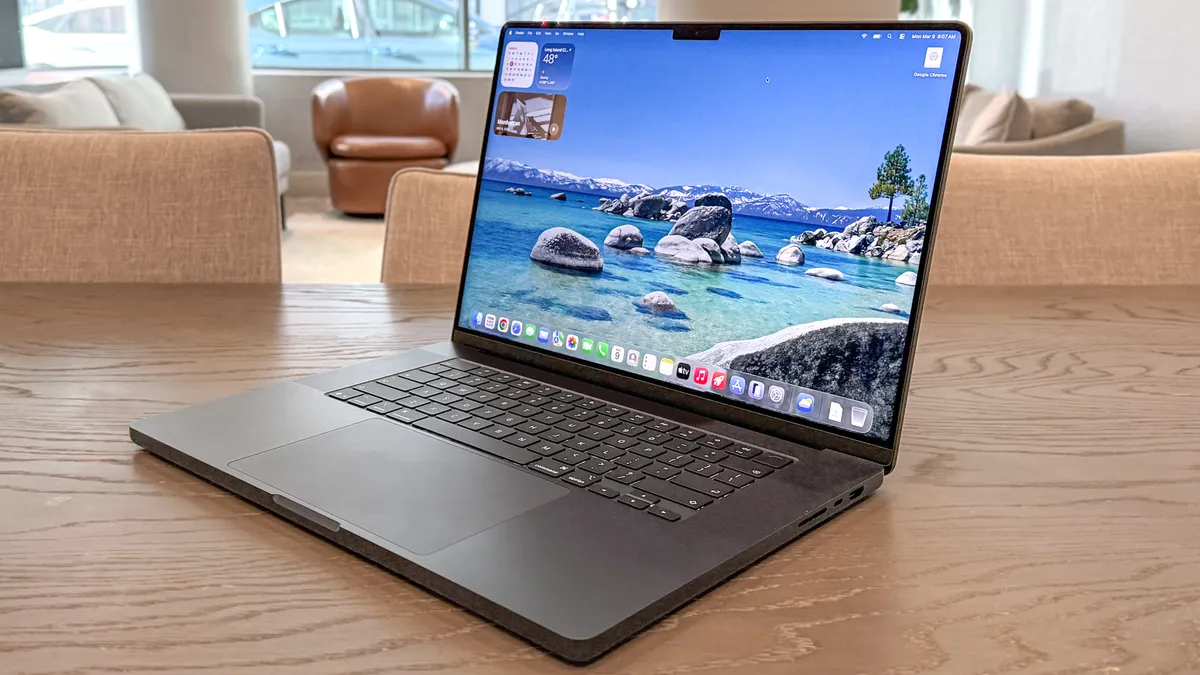
A lot of folks came into the RTX Spark launch hoping for it to be a MacBook Pro killer. If you measure by the CPU, creator performance and battery life, it isn’t.
Chip |
Geekbench 7 single-core |
Geekbench 7 multi-core |
|---|---|---|
Nvidia RTX Spark (20-core CPU) |
2604 |
23610 |
Apple M5 Pro |
3690 |
29659 |
Qualcomm Snapdragon X2 Elite Extreme |
3214 |
23645 |
AMD Ryzen AI Max 395+ |
2407 |
20856 |
Intel Core Ultra x9 388H |
2574 |
17223 |
In multi-core metrics, the Nvidia chip in here performs at the top of its class for Windows laptops, but the M5 Pro does peek ahead.
And the same can be said for creative tasks like transcoding video or working across Photoshop or Premiere Pro, as you saw above. It does end the MacBook dilemma as I mentioned above, but if you have a specific use case, you’ll get faster speeds by going for Apple here.
And then there’s that stamina portion of things. Don’t get me wrong — the claim of “all day battery life” is technically true, but Surface Laptop Ultra barely touches the sides of the efficiency of Apple silicon.
Chip (laptop) |
Web browsing battery life test result (hh:mm) |
|---|---|
RTX Spark (Microsoft Surface Laptop Ultra) |
10:15 |
M5 Pro (16-inch MacBook Pro) |
21:25 |
Snapdragon X2 Elite (Zenbook A16) |
10:26 |
Intel Core Ultra X9 (Asus Zenbook Duo one screen) |
14:23 |
AMD Ryzen AI Max 395+ (ProArt Go Pro Edition PX13) |
11:12 |
When it comes to gaming, at just over 1.5 hours, you can think of your RTX Spark running at full pelt in AAA titles (or AI tasks) lasting just a little bit longer than your standard issue gaming laptop.
The performance overall is impressive (if you know what to do with it…more on that in a bit), but make sure you bring that 140W charger with you.
Popping the hype bubble with a few reality checks

I’ll be upfront. This laptop is not for everyone. An RTX 50-series gaming laptop could do a lot of what you see here, and if gaming isn’t your main focus, a MacBook Pro could be the move.
So let’s get down to brass tacks here with some reality checks on who this is for:
- The big differentiator is unified memory: With one giant pool of memory to share across all the internals, that’s capable of running far larger local AI models than your standard gaming laptop.
- The Nvidia advantage in AI: Thanks to the AI software stack being almost overwhelmingly Nvidia-optimized, you’ll get the fastest local performance of any laptop.
- The PixelSense mini LED display: It's bright and color accurate, but it lacks the pop of OLED RTX Spark options like the Asus ProArt P16 or the HP OmniBook Ultra 16.
Of course, I can talk about this being the everything machine it is, but when you break down the big things that give RTX Spark the edge here in any buying decision, it starts to level the market in your mind and give clarity to who should buy this.
If you are an AI enthusiast/developer, or you’re keen to jump into the field of agentic AI/AI creative, this is the laptop for you.
If you want good gaming on-the-go, a gaming laptop is the way to go.
If you want portable creator performance, the MacBook Pro reigns supreme.

The Spark does touch on all these things, and it does them well. But at those kinds of prices? If you have clear intentions around what work you’re doing but nothing specific in mind for embracing AI agents (as you’ll see from some of our reviews), this is an investment you may regret.
Microsoft Surface Laptop Ultra: Verdict

The Surface Laptop Ultra is a remarkable piece of hardware. The utilitarian design, brilliantly clever magnetic USB-C port and communicative haptic touchpad prove that Microsoft’s hardware engineering is operating at the highest level.
And as it should, because the RTX Spark chip inside is a bit of a breakthrough for the local agentic future of computing, as well as a monster for creators, developers and gamers alike.
But to be clear: this isn’t a MacBook Pro killer. You’ll notice that in CPU and battery life. Instead the sheer force of that chip and unified memory makes it a weapon for pro workloads — housed in a mean-looking chassis.

Follow Tom's Guide on Google News and add us as a preferred source to get our up-to-date news, analysis, and reviews in your feeds.