I never thought the words "my dream keyboard" would come out of my mouth. Two and a half years ago, I didn't really care much about keyboards — and I was then introduced to the vast world of mechanical and Hall Effect decks. Things haven't been the same ever since. I've come to realize that a good keyboard can really uplift your mood, and make you a better typist — and as someone whose bread and butter depends on typing, I need a powerful deck.
I've reviewed nearly 100 keyboards during those last two and a half years, and I think my search for the best mechanical keyboard is finally over. I've spent the last two weeks typing on the typewriter-style Epomaker Glyph, and it upstages every other productivity keyboard in more ways than one.
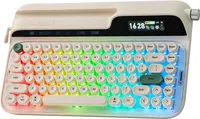
The Glyph is perhaps one of the best built and most beautifully designed keyboards I've ever tested. Its rounded, typewriter-like keycaps and creamy sound profile are sure to draw eyeballs to your desk — in the best way possible. Dual screens that show the board's vitals (or GIFs) are a nice touch, and honestly, there's nothing I'd change about the Glyph. Here's why it's my dream keyboard.
Drool-worthy design

There's so much to love about the Epomaker Glyph, and its typewriter-like design is one of its most striking features. The Glyph's body is covered in Retro White while its rounded keycaps utilize a combination of sage green and off-white. It's soft and glossy to look at and touch, and when you throw in south-facing RGB lighting as well as an ambient light strip that falls on the surface the keyboard is sitting on, you've got yourself a winner.
The Glyph isn't a "typewriter-style" keyboard only by name, and it's got a specific typewriter-like function to prove it. A return lever is located in the top-left corner which acts as the Enter key when pushed up and Backspace when pulled down. I know that you're thinking that's so gimmicky, and I thought the same when I first saw the keyboard — but I've been using it every so often while typing, and it's great fun.
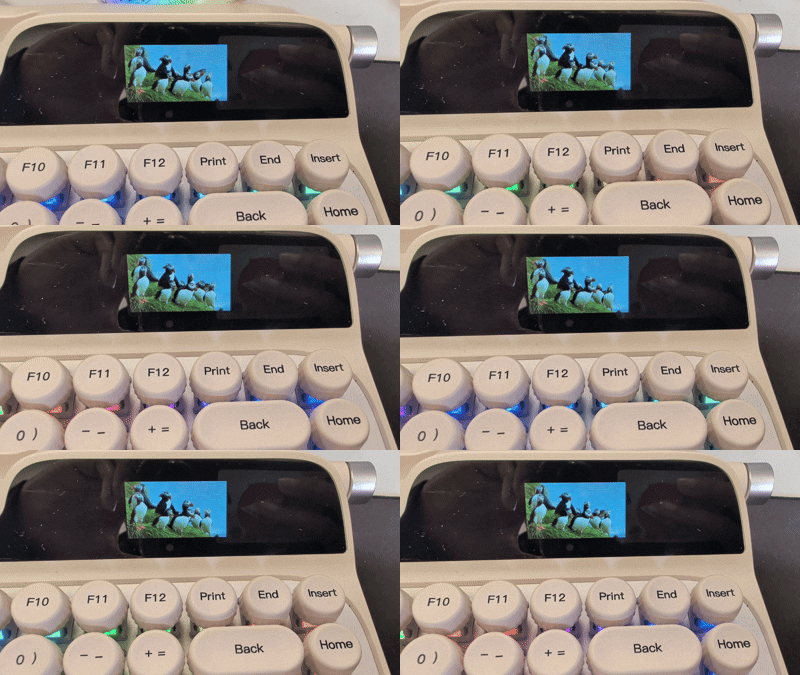
What I love about the Glyph is its dual screens which help it strike a balance between modern functionality and retro aesthetics. These screens display the date and time, and the keyboard's vitals, such as battery life, connection mode, active operating system, CPU usage, and more. Or you could display a GIF of puffins, like I did!
Call me a speed demon

A keyboard's looks mean nothing if it isn't good to type on — and the Epomaker Glyph is a sheer delight. No word of a lie, this is the best keyboard I've typed on so far. It comes fitted with pre-lubed Epomaker Wisteria V2 linear switches which require just 38g of force to activate, and have a pre-travel distance of 2mm (total 3.6mm). Thanks to these specs, you don't need to press them all the way down to activate them, which means that you can type quickly.
And that's exactly what I've been doing on the Glyph. Call me a speed demon because I've been able to achieve 109 words per minute with 93.2% accuracy — and that's a new personal best for me. I love everything about typing on the Glyph: the double-shot PBT keycaps, the type-feel, and most of all, the suuuuuper creamy sound profile. It's delicious.
As mechanical keyboards go, the Glyph is downright fantastic to type on. It's hot-swappable too so if you aren't a fan of the stock switches (which I'd find surprising), you can grab any south-facing 3- and 5-pin MX switches and pop them in without de- and re-soldering them to the PCB.
Comfort for days

I love it when keyboards, mice or any other peripherals come with accessories, and the Epomaker Glyph is accompanied by my most favorite yet. Included in the box is a CloudGel wrist rest that's made of high-quality silicone and PVC materials, and it's so soft to rest my wrists on. It packs gentle cushioning which alleviates any pressure I would have felt otherwise.
The wrist rest also features a slow-rebound gel design which deforms according to the pressure and shape of your wrists. Your hands then feel comfortable, even when you're working long hours. I've typed extensively on the Glyph and I haven't felt any discomfort. Even if you don't want to get the Glyph (but you really should), you can grab the wrist rest separately for $24 / £18.

If you want a mechanical keyboard that looks ridiculously good, packs plenty of useful modern features, sounds like music to your ears, and is a joy to type on, few are better than the Glyph. I could wax lyrical about the keyboard all day long, but you can also read my full Epomaker Glyph review for that.
I can't believe it took this long to find my dream keyboard, but the Glyph was certainly worth the wait.

Follow Tom's Guide on Google News and add us as a preferred source to get our up-to-date news, analysis, and reviews in your feeds. Alternatively, you can read our content on the Tom's Guide app available now for iOS and Android. Subscribe to Tom's Guide on YouTube and follow us on TikTok. Finally, you can visit our dedicated Tom's Guide Savings Squad hub for expert help on getting the best products for less.
More from Tom's Guide
- ‘The most absurd and wonderful keyboard I’ve ever typed on’: I tested the typewriter-style Epomaker Glyph and it’s earned a permanent spot on my desk
- I’m sick of pretending Hall Effect keyboards are the be-all end-all — here’s why I’d still pick a mechanical deck in 2026
- The best mechanical keyboards in 2026