Gemini live video and screen sharing is now free for Android — here's how to use it
No longer locked behind a paywall

Here at Tom’s Guide our expert editors are committed to bringing you the best news, reviews and guides to help you stay informed and ahead of the curve!
You are now subscribed
Your newsletter sign-up was successful
Want to add more newsletters?
Daily (Mon-Sun)
Tom's Guide Daily
Sign up to get the latest updates on all of your favorite content! From cutting-edge tech news and the hottest streaming buzz to unbeatable deals on the best products and in-depth reviews, we’ve got you covered.
Weekly on Thursday
Tom's AI Guide
Be AI savvy with your weekly newsletter summing up all the biggest AI news you need to know. Plus, analysis from our AI editor and tips on how to use the latest AI tools!
Weekly on Friday
Tom's iGuide
Unlock the vast world of Apple news straight to your inbox. With coverage on everything from exciting product launches to essential software updates, this is your go-to source for the latest updates on all the best Apple content.
Weekly on Monday
Tom's Streaming Guide
Our weekly newsletter is expertly crafted to immerse you in the world of streaming. Stay updated on the latest releases and our top recommendations across your favorite streaming platforms.
Join the club
Get full access to premium articles, exclusive features and a growing list of member rewards.
Google just unlocked one of its most used AI features for free. Gemini Live, which was previously only available to paying Gemini Advanced subscribers, is now rolling out to all Android users — no subscription required.
Gemini Live lets you share your smartphone’s camera or screen with Google’s AI assistant in real time. This means that wherever you are, you can now get help based on what you're seeing or doing.
Powered by Google’s next-gen Astra model, Gemini Live responds in human-like conversations similar to a real assistant and less like a chatbot.
What is Gemini Live, exactly?
With Gemini Live, users can share their phone’s camera feed or screen with the AI assistant to get help based on visual input.
For example, pointing the camera at a plant might prompt the assistant to identify it, while screen sharing during online shopping could surface product comparisons or additional information.
The camera enables the assistant to interpret what’s in view, and the screen-sharing feature allows it to respond to what’s happening on the device in real time.
How to use Gemini Live
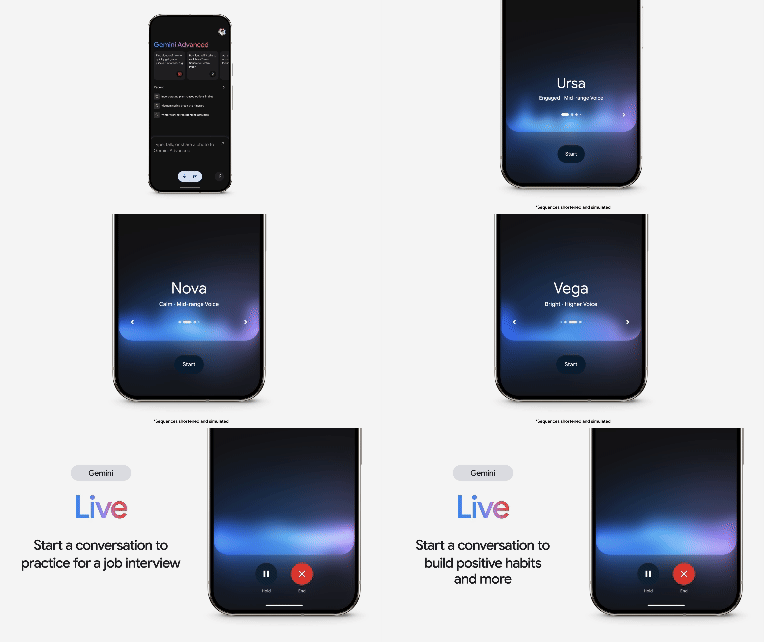
To try it out, just open the Gemini app on your Android phone. You’ll now see a new “Share screen with Live” button — tap that to begin screen sharing. If you want to use the camera instead, enter the full-screen Gemini Live mode and tap the camera icon to start a feed.
While active, you’ll see an indicator in your notification bar letting you know the session is live. You can stop sharing at any time with just a tap from the notification panel.
Get instant access to breaking news, the hottest reviews, great deals and helpful tips.
Final thoughts
The rollout of Gemini Live to all Android users appears to be part of Google’s broader effort to integrate AI more deeply into its mobile ecosystem.
Removing the subscription requirement makes the feature more widely accessible, allowing users to interact with the assistant using visual context from their camera or screen.
As AI tools increasingly expand beyond text-based input, features like this suggest a shift toward more real-world applications. The update is gradually rolling out through the Gemini app in the coming weeks.
More from Tom's Guide
- These 5 AI prompts work like magic — no matter which chatbot you use
- Google just made its AI tools free for college students — here's how to get them
- You can now use Google's AI to make videos from text — and I'm already obsessed

Amanda Caswell is an award-winning journalist, bestselling YA author, and one of today’s leading voices in AI and technology. A celebrated contributor to various news outlets, her sharp insights and relatable storytelling have earned her a loyal readership. Amanda’s work has been recognized with prestigious honors, including outstanding contribution to media.
Known for her ability to bring clarity to even the most complex topics, Amanda seamlessly blends innovation and creativity, inspiring readers to embrace the power of AI and emerging technologies. As a certified prompt engineer, she continues to push the boundaries of how humans and AI can work together.
Beyond her journalism career, Amanda is a long-distance runner and mom of three. She lives in New Jersey.
You must confirm your public display name before commenting
Please logout and then login again, you will then be prompted to enter your display name.